Health Experiments: A guide to learning how your habits impact your health.

What are health experiments?

Health experiments is a feature in Bearable that we’ve created to help our users to get a more detailed view of how new habits impact their health and well-being. We created this feature because, if – like us – you live with health issues, you know that identifying effective self-management habits can be hard.

Whether you seek advice from online publishers like Healthline.com, ask an online community or even get advice from a medical professional. There’s always a long list of recommended habits that could help. 

Of course, it can be hard to understand what impact new habits really have. Not only on your symptoms but also their impact on other metrics that impact your health, happiness, and well-being.

With this in mind, Health experiments make it easier for Bearable users to begin a new habit and get a clear view of how this specific habit correlates with changes in:

    1. Symptoms of a single health issue.
    2. Symptoms of multiple health issues.
    3. Sleep quality & quantity.
    4. Changes in Mood.
    5. Changes in Energy levels.
    6. Custom Ratings such as Productivity.
    7. Health measurements such as Heart rate .

Ultimately, our aim with health experiments is to make it easier than ever to identify the things that improve and worsen your health.

How to use health experiments?

When you visit the experiments tab in Bearable you’ll be presented with two types of experiments:

      1. Community Experiments such as Digital bedtime detox and Deep sleep breathing 4-7-8. These experiments include instructions on how to perform the habit and sometimes also a guided video for you to follow each day.

      2. Custom Experiments which – as the name suggests – allows you to create your own experiment using any treatment or habit that you think might have an impact on your health. However, these don’t include instructions or guided videos.

As Community experiments are fairly self-explanatory, we’ll focus on explaining how to use Custom experiments:

      1. Select the type of experiment you’d like to run.
        The options include Mindful, Active, Sleep, Dietary, and Other. There’s very little difference between these options but they dictate the icon and colour scheme used and make it easier to distinguish between multiple experiments.


      2. Select the thing you want to track.
        On this screen, you’re given two options:

        • Select from your existing factors.
          This lets you choose a factor from your factor journal and is especially useful if there’s something that you’ve struggled to get clear insights into in the past or is an old habit that you’d like a more detailed view of. Existing factors tracked during an experiment will also appear in your insights under the existing factor instead of as a new factor.

        • Create new.
          This lets you define a new factor that you’d like to begin tracking for the first time as an experiment. This is especially useful if you’re planning on beginning a new habit or treatment that you haven’t tried before. You’ll also be asked which factor category you’d like to add the new factor to and this is so that you can continue tracking the habit once the experiment has been completed (provided it had a positive impact).

      3. How long would you like the experiment to last.
        This determines the length of the experiment but it’s important for us to point out that you don’t need to complete the experiment every day. Instead, what we recommend is that you attempt to complete the experiment at least 3 times. Bearing in mind that the more days that you complete the experiment the more accurate your experiment results will be. So, for example, if you think you can complete the experiment 3 times within 30 days, then you should select the 30-day window.

      4. What time of day do you plan to do this.
        This determines how your symptoms will be analysed. For example, if you set up an afternoon experiment and your symptoms are only present in the morning, we won’t include these symptoms in your insights. If you’d just like to analyse the impact on your symptoms throughout the day, you can select the no specific time option.

      5. Starting your experiment & selecting outcomes.
        Once you’ve completed step 4, you’ll be given the option to Save for later or Start experiment. If you select Start experiment you’ll be asked to:

        • Select one main outcome.
          This is the first outcome that will appear in your experiment results. Use this to select the main outcome you think the experiment will have an impact on.

        • Select up to 8 outcomes.
          After you select the main outcome, you have the option to select 7 more outcomes. These could be symptoms, mood, energy, sleep, or custom ratings like productivity. Anything that you think the experiment might have an effect upon. Altogether, these eight outcomes make up your ‘experiments results’ report.

      6. Same day or Next day effect.
        If you’re interested in seeing how the experiments impact your outcomes on the day after the experiment took place. This is especially useful if the experiment is likely to take place right before you go to sleep. For example, if you want to know how going to bed early impacts your mood the next morning, selecting “next day” is right for you.

      7. Set up reminders.
        This lets you set a single reminder that will be sent to you every day during your experiment.

        Once you’ve completed these steps your experiment will begin and a new experiment section will appear at the top of your home screen. This section can be used to mark the experiment as completed each day (using the circular check box on the left) and if you tap on the arrow on the right-hand side you’ll be taken to an overview of your experiment results.

        If you want to edit your experiment outcomes, change your reminders, or cancel the experiment, you can do this by:

          1. Tapping the right-hand side of the experiment section on your home screen.
          2. On the ‘experiment results’ screen tap the icon in the top right-hand corner of the screen.
          3. A pop-up will appear that gives you options to cancel or edit the experiment.

What to do before beginning an experiment?

There are a few useful things to consider before you begin an experiment:

      1. Choosing an experiment.
        When you’re deciding what to track, we recommend beginning with a question. For example, “how can I improve the symptom ‘anxious thoughts’?” Once you’ve defined the outcome that you’d like to learn about (anxious thoughts) we recommend that you look for common recommendations from credible sources such as a medical publisher with a strict editorial policy (such as the MayoClinic or NHS websites) or a medical professional. For example, you might find Cognitive Behavioural Therapy (CBT) is a common suggestion for tackling ‘anxious thoughts’. With this information, you now have the basis for your experiment:

          1. An outcome (anxious thoughts)
          2. A factor (CBT)

      2. Confounding factors.
        Confounding factors are variables that might impact your results and so planning to reduce the number of confounding factors is important. Put simply, ensuring that you don’t introduce additional new factors into your life during the experiment should give you the best quality results. For example, if you’re testing the impact of CBT on ‘anxious thoughts’, drinking more alcohol or caffeine than usual could have a negative effect on the results. This is because they’re likely to make your ‘anxious thoughts’ worse and potentially offset any positive effect of CBT. Another solution to this is to complete the experiment on as many days as possible so that confounding variables won’t have as much of a significant impact on your results.

      3. Tracking a baseline.
        There are two ways to do this. The first is to track your outcome for at least 3 days before the experiment begins so that Bearable can determine an average score to compare your results to. The second option is to choose not to complete the experiment on three of the e.g. 30 day experiment window. The days on which you don’t complete the experiment can then be used as your baseline.

How to interpret your insights?

Understanding the results of your experiment is easy. Once you complete the final day of the experiment – by checking the box on your home screen for the last time – you’ll be given the option to view your results.

The results pop up as a slideshow, with the first slides telling you how many days of the experiment you completed. You can then swipe through each of the slides to be shown:

      1. A graph displaying how you scored each outcome during the experiment with the ‘completed days’ shown as purple rectangles along the x-axis.

      2. The percentage change in your outcome score which can be toggled between ‘with vs. without’ and ‘Since start vs. before’.

      3. A written explanation of this percentage change in outcome score.

      4. Your ‘With vs. without’ and ‘Since start vs. before’ scores, shown on either side of the main change in outcome score.

You can also revisit the results of your past experiments by visiting the experiments tab, where you’ll see a section named ‘ recently done’. By clicking the ‘see all’ button in the top right corner, you’ll be taken to a page with an overview of all your past experiments. You can click on any of them to be taken to the results page for each experiment.

If you do need help interpreting your insights, you can contact the Bearable support team at support@bearable.app or share your results anonymously with other Bearable users on our Discord server and Subreddit.

💡 Please note, It’s important to be aware that correlation does not necessarily mean causation and you should be cautious about interpreting any insights as fact.

Disclaimer. Health experiments are meant as a fun way to build consistent, healthy habits, and are not intended to constitute a substitute for professional medical advice. Always seek the advice of your doctor or other qualified healthcare providers with any questions you may have regarding a medical condition. Never disregard professional medical advice or delay in seeking it because of something you have read in this app or on our website. Bearable is not liable for any acts, decisions or omissions you make.

Looking For More Info?

    1. Check out our support blog for answers to common questions.
    2. Post questions on our subreddit or chat with users on our discord server.
    3. Take a look at our blog to see how our team member, Jesse, uses Bearable.

Requesting a refund

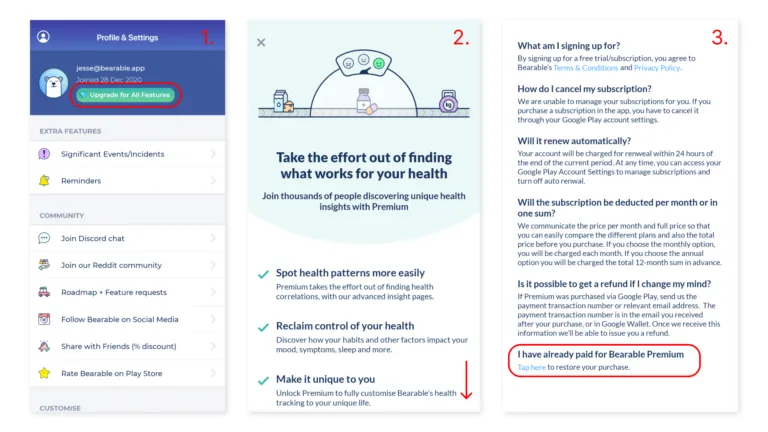
Your subscription is managed by the App Store or Google Play Store and unfortunately they give us limited ability to assist you with the refund process. 

However you can request a refund from them directly using the links below:

    • Android
      Learn how to contact the Google Play Store for a refund here.

    • Apple/iOS
      Learn how to contact the App Store for a refund here.

If you have any questions about this process, please reach out to us at support@bearable.app.

Canceling your Bearable subscription

Bearable doesn’t directly manage user subscriptions, so your subscription must be updated directly on the App Store or Google Play Store.

Canceling on iOS:  

    1. Open your Settings App
    2. Tap your name at the top of that page
    3. Tap subscriptions
    4. Tab Bearable
    5. Cancel your subscription.

See more information about how to cancel your subscription on an Apple device, here.

Canceling on Android: 

    1. Open the Google Play Store
    2. Open the menu in this app
    3. Tap Payments & Subscriptions
    4. Tap Bearable
    5. Cancel your subscription. 

See more information about how to cancel your subscription on an Android device, here.

Still need help?

If you have any questions or need help with canceling your subscription, you can reach out to us at support@bearable.app. If you have already reached out to us we will be in touch as soon as possible.

Contact Bearable for support.

🤓 Visit our FAQ.

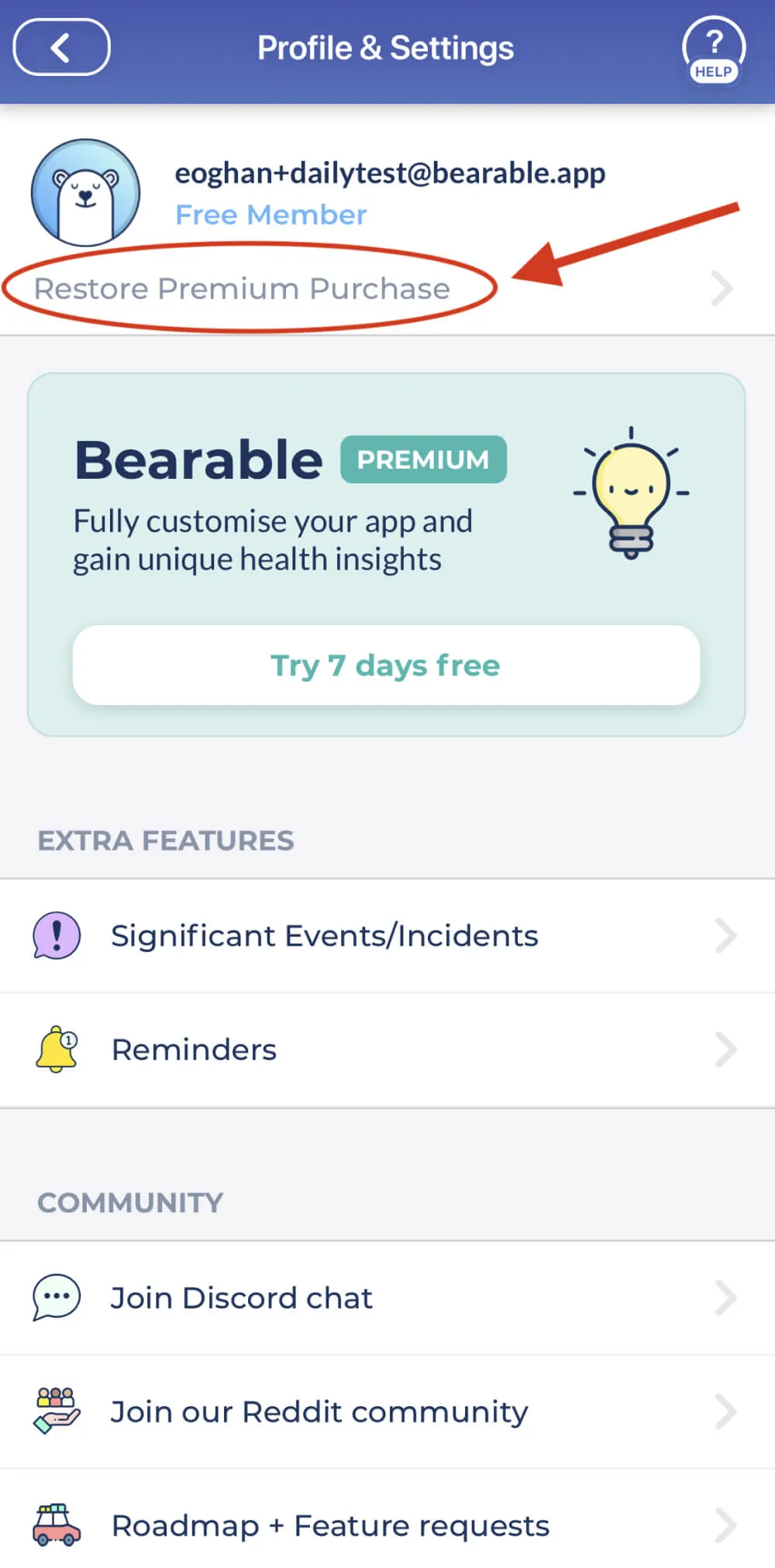
Before you get in touch, check out our support blog to see if there’s already an answer to your question. You can find tips on what to track and solutions to issues like restoring your subscription or changing units of measurement.

✉️ Contact the Bearable support team.

You can contact a member of our team directly by emailing support@bearable.app. Eoghan, our lovely colleague usually answers in under 24 hours. You can contact support with any questions that you have about Bearable, including questions about what to track, bugs, crashes, your data, and anything else that you’d like some help to understand.

📮 Post a question to our Reddit community.

If you’d like to hear the opinions and advice of other Bearable users, one of your options is to share a post on our subreddit, r/BearableApp. Other Bearable users are great at helping you to understand what to track, how to interpret your results, and to get feedback on your new feature ideas. 

💬 Chat with Bearable users on Discord.

If you’re not a Reddit user, or you’d rather have an chat with another anonymous Bearable user in real-time, then our Discord server might be the best option for you. Our Discord community is great at providing support, advice, and daily check-ins. There are also a number of channels for chatting about different topics beyond health conditions and Bearable.

💡Share your ideas on our roadmap.

One of the things that we love most about Bearable users is that they often have loads of great ideas. The best way to share them is on our public roadmap. This is a dedicated space for users to share their new feature requests and to comment and vote on one another’s ideas. The Bearable product team uses this as a guide when deciding upon future updates to the app.

7 Tips to help you decide what to track in Bearable


One of the most common questions that new Bearable users ask us is: ‘What should I track’? So, in this short post, we’ll try to help you to answer that question.

1.  🎯 Track just few things to begin with.

It can be tempting to track everything but it can be more useful and manageable to begin by keeping it simple and track just a few important things. This is especially true when deciding what factors (i.e. choices, habits and behaviours) to track.

2. 🔍 Start with a question.

What’s the biggest question that you have about your health right now? You might be wondering what’s triggering your anxiety, what helps you to manage pain, or what improves your levels of fatigue. Focus on one question at a time and use this to help decide which symptoms and factors to track.

3. 🔥Track priority symptoms.

Try to focus on jus tracking the symptoms that are having the biggest impact on your overall wellbeing. For example, rather than tracking every symptom of Anxiety, you might want to begin by just tracking Anxiety symptoms as a whole.

4. ✅ Track common triggers and treatments.

Google common causes and treatments for your priority health issue and use them to help you decide which factors to track in Bearable. For example, this Healthline article outlines some common causes of irritability that could help you to decide what factors to focus on.

5. 💊 Track an existing treatment.

In an effort to manage a health issue, you might already be taking cold showers, a new medication, or going to therapy. It can be useful to track the correlation between these factors and changes in your health to understand if they’re having the impact that you’d like.

6. ⛏️ Break things down.

Some of the default factors in Bearable are quite broad and it can be beneficial to think about creating more specific factors. For example, instead of tracking ‘social event’ you could track ‘saw Chad’, ‘saw Karen’, and ‘saw Mom’ to determine the correlation between individual people and the impact they each have on your health.

7. 🤔 Ask a new question.

Once you have enough data to answer a question about your health, you don’t need to keep tracking the same things. For example, you might find that drinking less coffee reduces your levels of irritability. At this point, it’s okay to begin tracking a completely different set of factors – and even different symptoms – based on any new questions that you have about your health. We recommend logging at least 14 days with a factor before making any decisions about its impact on your health.

👋 Still not sure what to track?

Get in touch with us at support@bearable.app and we’ll help you decide what to track.

How to find correlations.


✏️ Collect enough data.

You’ll begin to see correlations in Bearable after you:

    • Have at least 3 days with a factor.
    • 3 at least days without the same factor.
    • Mood, Symptom, Sleep, or Energy scores on each of these days.

Bearable is then able to compare your scores for days when the factor occurred vs. the days it didn’t occur and show you a correlation. However, the more data you collect, the more accurate and less noisy the results will be.   Remember, Bearable will take timing into account, so if you had e.g. caffeine in the evening and your symptoms were in the morning, it wouldn’t associate the two together.

For the best results, we recommend tracking a factor over a 30-day period.

🗓️ Stay up to date on your health metrics.

To ensure that Bearable can show you the most accurate correlations, it’s important to keep track of at least one of your Mood, Symptom, Sleep, or Energy scores every day. If you’re only interested in how a factor correlates with one of these health metrics, it’s okay to only track that metric every day instead of all of them.

For example, if you want to know how caffeine correlates with changes in your sleep quality, you can just track your sleep every day without tracking Mood, Symptoms, or Energy. 

📈 Use the Comparison Graph.

For Bearable users with a free account, the best way to look for correlations is using the Comparison Graph. When you visit the Insights tab, rotate your phone to be shown a graph where you can compare your Factors to changes in Mood, Symptoms, Sleep, Energy and more.

To find correlations on the comparison graph:

    1. Select Mood, Symptom Score, Individual Symptoms, Sleep Quality, Sleep Quantity, or Energy Levels in one of the drop-down menus at the bottom of the screen. This will appear as either a bar or line on the graph.
    2. Select a Factor in the top right-hand corner of the screen and this will appear as a gradient in the background of the graph on the days when the factor was tracked.
    3. With these two things selected, you can now determine if days when the factor occurred had a positive, negative, or neutral impact on the health metric that you’ve selected. 

Note. You can hide the bar and/or line graph using the eye icons at the bottom of the screen.

📊 Use Factor Effect Reports.

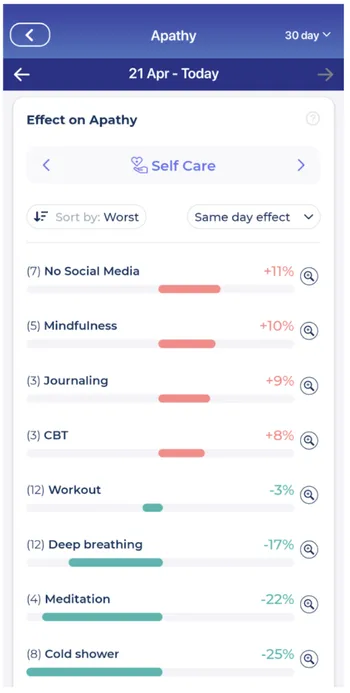
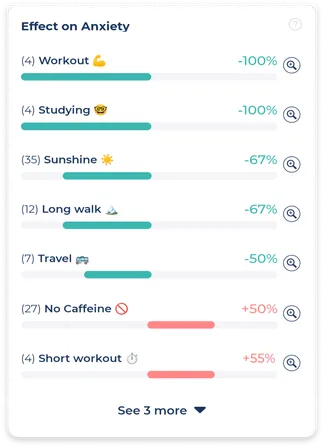
Bearable users on a free trial or premium subscription can access a number of different Factor Effect reports from the Insights tab. These reports automate the process of finding correlations so that you don’t have to look for them yourself.

Factor Effect reports can be found by clicking into any of the following reports in the insights tab:

    • The advanced Mood report
    • The advanced Symptom report
    • Individual Symptom reports
    • The advanced Sleep report
    • Individual Factor reports
    • The advanced Energy report.

You can scroll through Factor effect reports to view how different categories of factors impact your health as well as view the 1day to 7day impact of a factor on your health. 

✋ Limit the factors you track.

Instead of tracking lots of Factors, try tracking only the factors that you suspect are most impacting your health, and that you’re most interested in gaining insights for.  For example, if you want to understand how caffeine affects your health, just track the days when you have caffeine vs. the days you don’t have caffeine.

If you try to track too many things at once it can become too much to keep on top of. 

🤔 Reflect on your results.

Your correlations might not always make sense at first so it’s important to take the time to think about why this is. For example, ‘acts of kindness’ might correlate with lower ‘sleep quality’, which doesn’t make a lot of sense until you take into account the fact that ‘acts of kindness’ are often tracked on days when ‘junk food’, ‘high stress’ and ‘caffeine’ are also being tracked. So it’s likely that ‘junk food’ and ‘caffeine’ are impacting ‘sleep quality’ rather than ‘acts of kindness’.

The Favorite Correlations chart is a great tool for helping you to think about the relationship between your different correlations.

🔬 Create more granular Factors.

Many Bearable users begin tracking quite broad Factors such as ‘socialised a lot’ and to get more useful results about how socialising really impacts your health it can help to break this Factor down into smaller Factors. For example, who you socialise with might impact your health and you can track this in a number of more granular ways:

      1. By social group such as ‘socialised with Family’, ‘Socialised with Colleagues’ or ‘Socialised with Friends’.
      2. By individual people such as ‘socialised with Chad’, ‘socialised with Dad’, or ‘socialised with Girlfriend’.
      3. By the type of socialising such as ‘socialised at party’, ‘socialised at bar’, ‘socialised outdoors’,‘socialised with big group’, ‘socialised with small group’, or ‘socialised with one person’.

Breaking down your Factors into more specific behaviours and/or events will help you to discover more specific correlations so that you can make more specific decisions about your health.

👋 Still have questions about your correlations?

Let us know by contacting support@bearable.app and a member of the Bearable team can help you with anything you need.

6 ways to get the most out of your Free Trial.

You’ve just signed up for your free trial with Bearable and we want to make sure that you know about the most useful features that you now have access to.

🤔 1. Discover what’s impacting individual health outcomes.

Factor Effect Reports show you the correlation between your factors and your health outcomes. This helps you to identify the habits, activities, and treatments that are improving or worsening your Mood, Symptoms, Sleep and Energy levels. 

📊 2. See how your choices and habits impact multiple health outcomes at a glance.

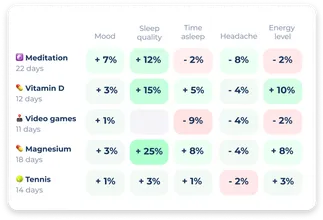
The Favourite Correlations chart at the top of the Insights page shows you how a Factor (e.g. Caffeine) correlates with multiple different health outcomes. This helps you to quickly find the activities, habits, or treatments that have the biggest net positive or net negative on your health.

💡 3. Identify trends and patterns in your symptoms.

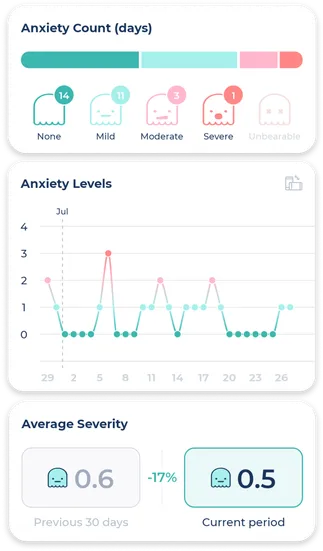
Advanced Symptom reports show you a breakdown of the frequency, trend, average occurrence and the average severity of individual symptoms. You can also view symptom-specific Factor Effect Reports and a list of commonly occurring symptoms.

🚀 4. Track anything!

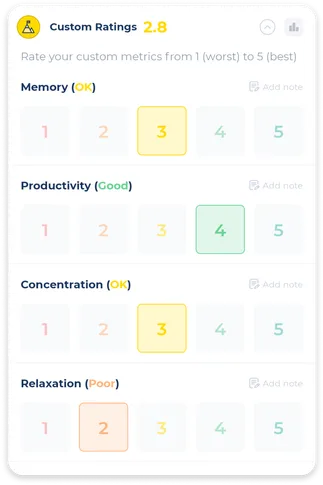
The Custom Ratings section lets you create your own metrics to rate on a 1 to 5 scale, from productivity and focus to anything else you can think of. Get creative! 

✏️ 5. Keep track of other useful things.

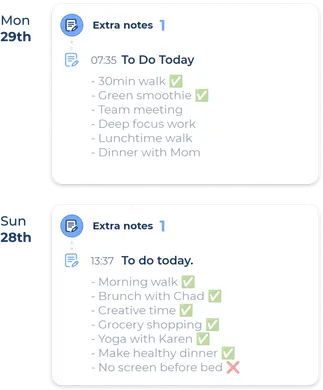
Need to keep notes to share with a Doctor or Therapist? Want to keep a private digital Journal or write daily Affirmations? Have something to track that doesn’t fit anywhere else in the app? Just need to keep a to-do list because of brain fog? Extra notes has you covered!

🚑 6. Understand the impact of one-off events on your health.

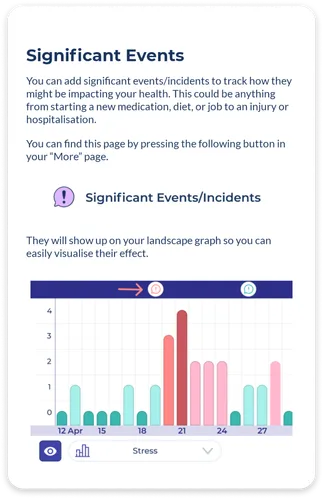
Bearable Premium gives you the option to track an unlimited number of Significant Events so that you can analyse their impact using the landscape graph. For example, the Significant Events feature can be used to track:

    • Appointments with your Doctor.
    • Birthdays and Anniversaries.
    • Changes in relationship status.
    • Changes in employment.
    • Acute illnesses.


👋
Still have questions about your free trial?

Let us know by contacting support@bearable.app and a member of the Bearable team can help with anything you need.

How to use Bearable Premium.

You might have seen the long list of features that you get with a Premium subscription in the app, but at its core, Bearable Premium helps you to achieve the following things:

Find correlations faster.

Subscribing to Bearable gives you access to Advanced Insights reports for Mood, Symptom Score, Symptoms, Sleep, Energy Levels, and Factors. These reports help you to visualise your data in a number of ways including showing you how your Factors correlate with changes in your health so that you no longer have to find these correlations manually.

🔭 View health trends over longer periods of time.

Bearable Premium allows you to compare your health data over different periods of time, including 30, 60, 90, and 365-day comparisons. This means that longer-term users can understand not only how their health is trending and changing month vs. month but also quarter vs. quarter and year vs. year.

📉 Identify short-term health trends.

Weekly Reports show you how your health has changed in the last 7 days vs. the previous 7 days and can be especially helpful for identifying health problems before they become too severe. Bearable subscribers can add up to 20 metrics to their report, including custom ratings, symptoms, and health measurements.

💡 Understand non-health outcomes.

If you’re someone that wants to understand changes in their productivity, concentration, work-life balance, or any metrics that aren’t directly related to your health, then custom ratings are for you. You can create as many custom ratings as you like, track them using a 1-5 scale, and view how they change week to week using the Weekly Report.

🔍 Track your health in more detail.

Bearable Premium members have access to the Extra Notes feature. This can be used for writing therapy, a place to keep affirmations, notes to share with your doctor, to-do lists, or even just to keep a regular diary.

Take more control of your health.

Favourite Correlations make it possible for Bearable subscribers to view the impact of Factors across an array of health metrics. This is particularly helpful when you want to identify the broader impact of a Factor on your health. For example, a Factor that improves Sleep might not also improve Symptoms, Mood, or Energy Levels. Favourite Correlations make it possible to identify Factors with the greatest net positive outcome.

🤝 Help other people to manage their health.

Bearable was launched in 2020 by our founder James after he used an early version of Bearable to manage chronic Migraines. We’re a purpose-driven team whose primary aim is to help people to manage their symptoms better and to give people more control over their health. By subscribing to Bearable, you help us to create new features, maintain and improve the app, and find even more ways to support and advocate for the wider community of people with health issues.

👋 Still have questions about Bearable Premium?

You can contact the Bearable team for support by emailing us on support@bearable.app with any questions you have about the app, interpreting your results, or even just understanding what to track.

Get the most out of your subscription.

Thanks for subscribing to Bearable, we want to let you know about a few features that are especially useful to longer-term Bearable users. 

🗓️ View health data over longer periods of time.

Once you’ve been using Bearable for longer than 30 days it can be helpful to view your data over longer periods of time. Use the 60-day, 90-day, and 12-month options on the insights tab to view to get an even bigger picture of your health.

🆘 Get support from the Bearable team.

From time to time you might run into trouble with Bearable. If something goes wrong with your account, if you have any questions or concerns, or just need a hand using one of the features, you can contact support@bearable.app and a member of our team will be available to help.

👋 Get advice and share your thoughts on Reddit.

Many of our longest-standing users are active on our subreddit r/BearableApp, which is where everything began just over 2 years ago. It’s mostly a community for chatting about the app and we also use it to get feedback and ideas about new features. If you want to be involved in shaping the future of Bearable then come and join us on Reddit.

💬 Chat with other Bearable users on Discord.

If you’re looking for support or advice from other people with health issues, or even just want a friendly person to chat to, our Discord community exists to cover a broad array of non-Bearable topics. We also share updates about beta testing here if you want to be the first to try out new features.

✋Suggest and vote on new features.

After a few weeks of using Bearable, you probably have some excellent ideas about how we could improve the app and we want to hear them! One of the main ways that we make decisions about features for the app is by reviewing user submissions, votes, and comments on our Public Roadmap.

👋 Still have some questions about your subscription?

Let us know by getting in touch with our support team at support@bearable.app

What are Factors? (and answers to other common questions)


🤔 1. What are Factors?

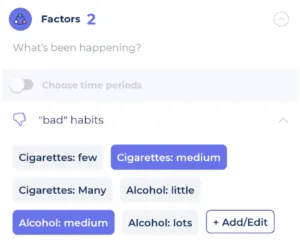
Factor is a term that we use to group together habits, events, and actions that happen in your life. For example, drinking a cup of coffee, going to work, meditating, arguing with your partner, and spending time outdoors are all Factors. You can think of them as anything that happens in your life but that doesn’t belong to one of the other categories in the app such as Mood, Emotions, Sleep, Symptoms, or Energy. Bearable analyses your Factor data to show you how different Factors correlate with changes in your health. You can access these reports in the Insights tab.

📈 2. What are Custom Ratings?

Custom Ratings were introduced to help users track health outcomes that don’t fall under the categories of Mood, Sleep, Symptoms, or Energy and that aren’t a Factor. For example, Productivity and Focus are interesting measures of performance and well-being that don’t naturally fit anywhere else in the app. It’s important that you don’t feel like you have to use them, but if you’re interested in correlations that aren’t directly related to your health, Custom Ratings is a helpful tool. 

🔍 3. What should I track?

To start with, try to focus on tracking as few things as possible. This makes it easier to stay on top of logging your factors. We’ve written a short article about what to track and if you’d still like some help getting set up you can also contact support@bearable.app or visit one of our online communities for the advice of other Bearable users.

🔭 4. How do I find correlations?

There are a few different ways to do this, so we wrote a short article to help you find useful correlations. In short, if you visit your Insights tab and rotate your phone, you’ll be shown a graph where you can compare your factors to your health metrics. Premium users can also click into any report from the Insights tab to find Factor Effect reports.

✋ 5. How do I get support?

If you need help with anything in Bearable we have a support team that you can contact via email on support@bearable.app. Our support desk is managed by Eoghan a real human person and member of the Bearable team, so you’re in good hands. You can also get support from other Bearable users by joining one of our online communities on Reddit, Facebook, or Discord.